

Bookings, round the clock.
Take online reservations 24/7. Add phone bookings and walk-ins to the same live book.
AI booking assistant includedFor independent restaurants, pubs and cafés
Guests book wherever they find you. Your team sees online bookings, phone bookings and walk-ins in one diary. No per-cover fees.
30 days free from the day you go live · No card neededMeet the people taking direct bookings with TableTango.

Overlooking Clapham Common, Mate’s brings together Italian dishes, Mediterranean flavours and cocktails. Behind the welcome, TableTango helps guests book directly with the restaurant.
“We’re very happy with the booking platform and really appreciate the way you’ve helped us throughout the process.”RedonMate’s Restaurant
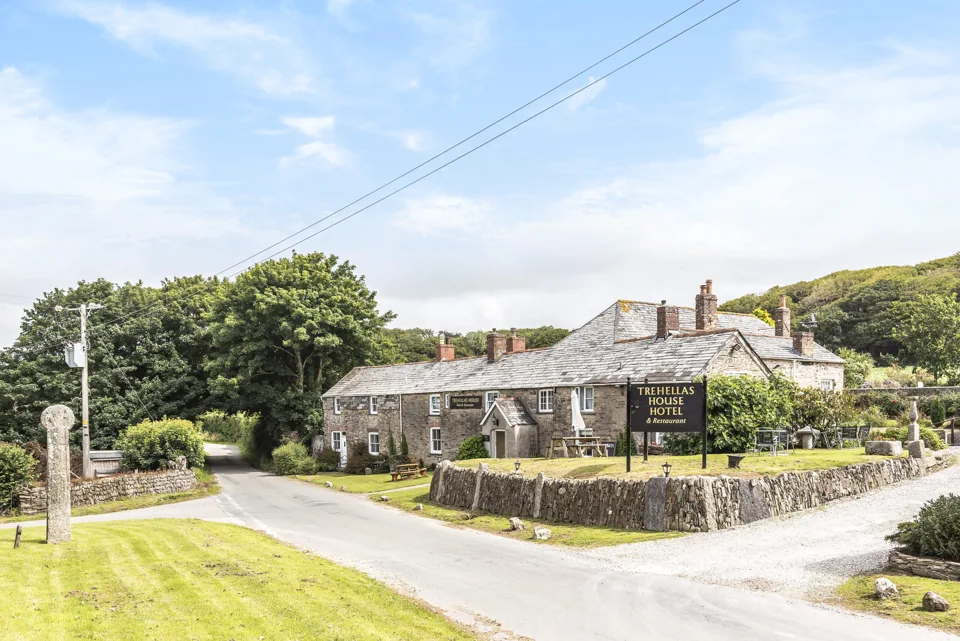
The hotel dates from around 1745. Today its restaurant welcomes locals and visitors as well as hotel guests. The team uses TableTango to manage bookings for Sunday lunch and evening meals.
Visit the Trehellas House websiteA little introduction to a calmer service.
The video couldn’t load. Open the video directly or read the transcript below.
Hi! I’m Tango, the table behind TableTango.
Guests book in seconds, day or night, on your own booking page. Every table lives on one smart floor plan.
Friendly reminders go out. Someone cancels? Your waitlist gets the table. After dinner, a thank-you asks for a review.
No commission. No per-cover fees.
TableTango. Shall we dance?
On screen: Help reduce no-shows. Optional texts cost extra. Stripe fees apply when taking payments. Try the live demo. No sign-up needed. tabletango.co.uk.
Take direct bookings, organise your floor and keep guests informed.
All in one place, with your guest relationships kept yours.
Take online reservations 24/7. Add phone bookings and walk-ins to the same live book.
AI booking assistant includedSee bookings, tables and guest notes together, with smart table assignment to help plan service.
Live book · Floor plan · Guest notesSend confirmations and reminders, see which guests have recent no-shows and offer freed tables to your waitlist.
Reminders · No-show history · WaitlistPlans for independent venues
Start with 30 days of the full system when you go live. No card needed, and no per-cover fees on either plan.
For venues that take most bookings by phone
Phone bookings and walk-ins your team adds don’t use your online allowance.
Or £90 a year paid upfront · Save £18
Everything in Free, with unlimited online bookings each month
| Feature | Free | Paid |
|---|---|---|
| Online bookings | 50/month · 20/day | Unlimited per month |
| Phone bookings and walk-ins | Outside the online limit | Outside the online limit |
| Booking page, link, website embed and QR poster | Included | Included |
| Your colours, menus and guest information | Included | Included |
| Email confirmations and reminders | Included | Included |
| AI booking chat for guests | — | Included |
| Feature | Free | Paid |
|---|---|---|
| Live diary, floor plan and automatic table assignment | Included | Included |
| Hours, closures, rooms and table combinations | Included | Included |
| Guest book, visit history and no-show tags | Included | Included |
| Staff PINs and paired devices | One paired device | Multiple devices |
| Waitlist and automatic offers when tables reopen | — | Included |
| Guest texts for booking updates and reminders | — | Prepaid SMS credits |
| Feature | Free | Paid |
|---|---|---|
| Events where guests pay at the venue | Included | Included |
| Events with payment at booking | — | On request · Stripe |
| Private functions diary and whole-room reservations | — | Optional · included |
| Kitchen sheet | — | Limited pilot |
| Feature | Free | Paid |
|---|---|---|
| Deposits, prepayments and paid add-ons | — | On request · Stripe |
| No-show Shield card protection | — | On request · Stripe |
| Feature | Free | Paid |
|---|---|---|
| After-visit feedback and optional Google review link | — | Included |
| Email marketing through your own Mailchimp | — | On request |
| Win-back list for returning guests | — | Included |
| Booking insights, source reporting and owner reports | — | Included |
| Owner AI assistant | — | Included |
Guest texts use prepaid credits. Stripe charges processing fees when you take payments. Mailchimp’s own pricing applies.
Bookings guests make through your TableTango link or embed count towards Free’s allowance. Staff-entered bookings don’t count. Free requires TableTango as the booking link on your website or Google profile. The booking limits in the Terms explain how monthly overages work.
On the paid plan, guest texts use separate prepaid SMS credit. Booking confirmations try email first. If accepted for sending, there is no confirmation text; otherwise an eligible text can be tried. Reminder texts keep their usual settings. New restaurants receive 100 one-off SMS credits when their booking page first goes live, with booking texts switched on by default (switch off any time), with prepaid top-ups available when needed. One credit is one message segment; long messages can use more than one. No-show Shield, deposits, prepayment and paid event bookings are on the paid plan at no extra cost — just ask and we'll switch them on. Payments go through your own connected Stripe account; Stripe's processing fees apply and TableTango takes no commission.
MAKE IT YOURS
Sign up and verify your UK mobile.
Set your hours, tables and booking preferences.
Publish when you’re ready. Add it to your website, social pages and QR poster.
Straight answers before
you get started.
Yes. Phone bookings and walk-ins drop into the same live book and floor plan in a couple of taps, so everything is in one place. Guests can also book online 24/7.
TableTango Free is coming soon. It has no monthly charge and covers up to 50 online bookings a month per venue: your booking page and form, smart tables, the floor plan, your guest book with no-show history tags, events booked to pay on the night, and email confirmations and reminders. Bookings you or your staff add never count and are never limited. Free sends email only, and TableTango must be the booking link on your website or Google profile.
The paid plan (£9 a month, or £90 a year paid upfront) adds AI booking, payments, the waitlist, guest marketing through your own Mailchimp, insights, private functions and guest texts. Guest texts run on separate SMS credit. Booking confirmations try email first. If accepted for sending, there is no confirmation text; otherwise an eligible text can be tried. Reminder texts keep their usual settings. New restaurants receive 100 one-off SMS credits when their booking page first goes live, with booking texts switched on by default (switch off any time). Long messages can use more than one credit; prepaid top-ups are available when needed.
Yes, on the paid plan. Switch on the optional private functions diary to record enquiries and confirm whole-room reservations, with time for setup and clear-up. Confirmed functions reserve those tables alongside your dining bookings. Staff can see the operational details on their devices. Owners can also allow managers to create and change functions, with a Manager PIN for each save. It is an internal diary: guests do not book functions online, and it does not collect function payments or send organiser messages.
Yes, on the paid plan. No-show Shield holds a card on the bookings you choose — large parties, peak slots — and charges a no-show fee under your own policy through Stripe Connect. You are the merchant, the fee is yours, less Stripe’s processing fee; TableTango takes no commission. You can also take a deposit or full prepayment at booking. Request payment access from TableTango, then connect Stripe and choose your policy. Stripe processing fees apply.
Your booking link goes on your Google Business Profile, your website, Instagram and a QR poster by the door — guests tap it and book, nothing to install. TableTango runs alongside your till: it takes the bookings and runs the floor, your till handles the bill. If you use Mailchimp, it connects to your own account too, for guests who opt in to your email news.
Yes. Names, numbers and visit history belong to your restaurant. We do not sell your guest data, and you can export your full guest book at any time and ask us for your complete booking history, with no TableTango fee. See our Privacy policy and DPA for how we process data on your behalf.
Yes. Guests can tick a box for your email news and offers when they book. Connect your own Mailchimp account in Settings › Guest marketing, and TableTango copies the guests who said yes into your audience, with the date they agreed and a TableTango tag. Only their email address is sent. If someone unsubscribes in Mailchimp, it is recorded in TableTango, and while you stay connected, an unsubscribe recorded in TableTango unsubscribes the guest in Mailchimp if TableTango added or tagged them there. You write and send your emails in Mailchimp; TableTango sends no marketing itself. Put the newsletter booking link from Settings › Guest marketing in your emails: bookings made through it show as ‘Your emails’ in Insights and in your owner report. Your owner assistant can suggest a first draft of an email from your venue’s own details, for you to check and send in Mailchimp, and Guests › Win-back has an invite-back message for guests who haven’t been in for a while. It is on the paid plan at no extra cost — just ask and we'll switch it on. Mailchimp’s own pricing applies: at the moment it costs nothing for up to 250 contacts (your existing and unsubscribed contacts count) and 500 emails a month; beyond that, or if you are already on a paid Mailchimp plan, Mailchimp bills you directly.
You set it up yourself: create an account, verify your UK mobile, add your details, hours and tables with a guided checklist, then tap Publish. There's no hardware and no app for your guests. Stuck at any point? Email support@tabletango.co.uk and we aim to reply within one working day, Monday to Friday.
Ask a question or tell us what you need.
We’ll help you decide whether TableTango fits.
Try the full system for 30 days from go-live. No card needed. The paid plan is £9 a month or £90 a year per venue, with no per-cover fees.
Start 30 days free